
Windows · Lock it down
Choose your Safe Wall
Decide what it takes to switch protection off: a wait, or your partner's OK.
Step 1 of 3
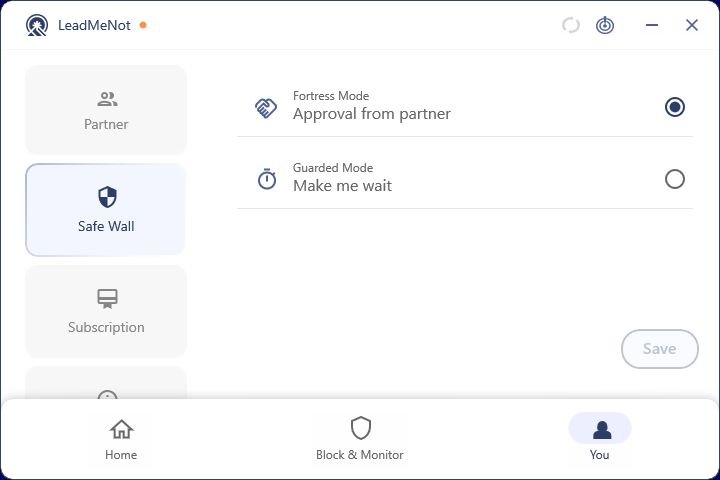
Open You › Safe Wall
Click You, then Safe Wall. Approval from partner (Fortress Mode) means any change needs your partner's OK. Make me wait (Guarded Mode) adds a countdown instead.
Approval from partner is the strongest. It only works once you've added a partner.
Step 2 of 3
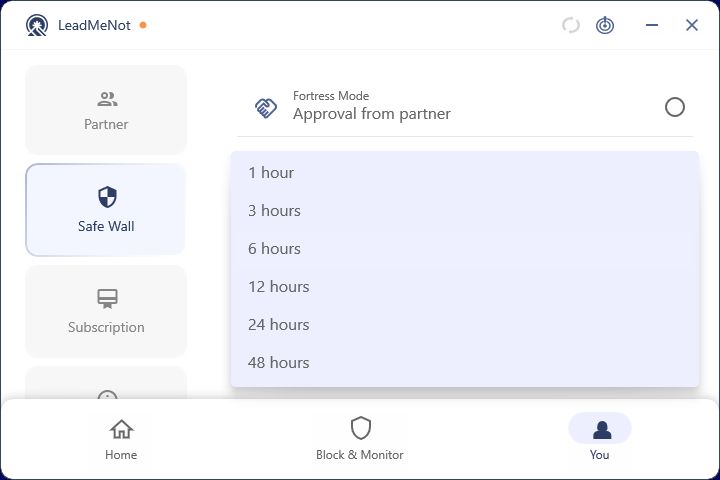
Make me wait: pick the time
If you choose Make me wait, pick how long the countdown is, from 1 hour up. Then click Save.
The wait applies to every change, even fixing a rule you just made. Still setting up? Email jason@leadmenot.org and we'll approve it.
Good to know
Step 3 of 3
Loosening it later goes through Safe Wall too
Switching from partner approval to a wait, or shortening the wait, is itself a protected change. Expect a request or a countdown.
Did this work?
Great. Here's what people usually do next:
Sorry about that. Email Jason and we'll include which guide and step you were on, or ask our assistant.